---
title: System / Network Configuration Menu
description: The System/Network Configuration Menu either hides or shows settings based on your answer to the first question, “Are You Using a Network?”
---
[Skip to content](https://help.taxxsavage.com/system-/-network-configuration-menu#main-content)
English
Show submenu for translations
[](https://taxxsavage.com/)
Open main navigation
Close main navigation
- English
Show submenu for translations
- Contact us
Contact us
How can we help you?
- There are no suggestions because the search field is empty.
1. [Taxx Savage Knowledge Base](https://help.taxxsavage.com/?hsLang=en)
2. [Taxx Savage Pro Desktop](https://help.taxxsavage.com/taxx-savage-pro-desktop?hsLang=en)
# System / Network Configuration Menu
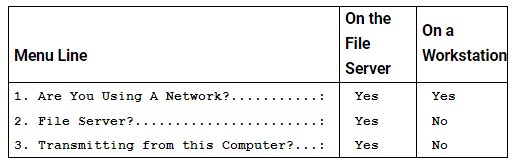
The System/Network Configuration Menu either hides or shows settings based on your answer to the first question, “Are You Using a Network?”. In the event that only one computer is used in your office, set the answer to this question as No then you will be done with this menu.
In the event that your office has several computers for tax return preparation all attached to one network router, answer the question Yes. One of the computers should be the File Server as others are referred to as workstations. The File Server is the Transmitting Computer.
For offices that use several computers for tax return preparations, the first three menu lines in the System/Network Configuration Menu are responded to in the following manner:
1. **File Server Address**
Information on this line should be similar to those on Line 6 and 7 as well as the Local Computer Name and Local IP Address. This line displays the File Server Information on a Workstation. In the event that you are unable to view the right File Server Information on Line 4 on a Workstation, apply the following steps:
- Click “4. File Server Address”
- Enter the File Server computer name in the “File Server Name” field.
- Then click “Connect to File Server”
To know the process was successful, a message, “File Server (IP address) Contacted!” will appear in a green colored rectangle. In case this message does not appear, ensure that the File Server computer name was spelt correctly and also ensure that the Workstation is connected to the same router as the File Server. In case you do not get a successful connection, seek help from our Technical Support team.
1. **Local Computer Name**
2. **Local IP Address**
These are purposefully for information and may be used in the diagnosis of network problems. On the File Server, unlike on a Workstation, the information on line 6 and 7 are similar to that in line 4.
- [FAQs](https://help.taxxsavage.com/faqs?hsLang=en)
- [Taxx Savage ProWeb](https://help.taxxsavage.com/taxx-savage-proweb?hsLang=en)
- [Support](https://help.taxxsavage.com/support?hsLang=en)
- [Reports](https://help.taxxsavage.com/reports?hsLang=en)
- [Account](https://help.taxxsavage.com/account?hsLang=en)
- [Federal Tax Questions](https://help.taxxsavage.com/federal-tax-questions?hsLang=en)
- [E-file and Direct Deposit](https://help.taxxsavage.com/e-file-and-direct-deposit?hsLang=en#main-content)
- [E-filing Questions](https://help.taxxsavage.com/e-file-and-direct-deposit?hsLang=en#e-filing-questions)
- [Deductions and Credits](https://help.taxxsavage.com/deductions-and-credits?hsLang=en)
- [Taxes](https://help.taxxsavage.com/taxes?hsLang=en)
- [General instructions](https://help.taxxsavage.com/general-instructions?hsLang=en)
- [Mobile App Questions and Troubleshooting](https://help.taxxsavage.com/mobile-app-questions-and-troubleshooting?hsLang=en)
- [Configuration](https://help.taxxsavage.com/configuration?hsLang=en)
- [General FAQ](https://help.taxxsavage.com/general-faq?hsLang=en)
- [Information Central](https://help.taxxsavage.com/information-central?hsLang=en)
- [Taxx Savage Pro Desktop](https://help.taxxsavage.com/taxx-savage-pro-desktop?hsLang=en)
- [Client Hub Navigation](https://help.taxxsavage.com/client-hub-navigation?hsLang=en#main-content)
- [Tools](https://help.taxxsavage.com/client-hub-navigation?hsLang=en#tools)
[](https://taxxsavage.com)
[mailto:email@email.com](mailto:email@email.com)
Copyright © 2026, Taxx Savage