---
title: How to Handle Error Messages for a Preparer’s Email or Phone Number
description: When encountering a setup error message, you will see a pop-up message like the ones displayed below.
---
[Skip to content](https://help.taxxsavage.com/how-to-handle-error-messages#main-content)
English
Show submenu for translations
[](https://taxxsavage.com/)
Open main navigation
Close main navigation
- English
Show submenu for translations
- Contact us
Contact us
How can we help you?
- There are no suggestions because the search field is empty.
1. [Taxx Savage Knowledge Base](https://help.taxxsavage.com/?hsLang=en)
2. [Taxx Savage ProWeb](https://help.taxxsavage.com/taxx-savage-proweb?hsLang=en)
# How to Handle Error Messages for a Preparer’s Email or Phone Number
When encountering a setup error message, you will see a pop-up message like the ones displayed below.
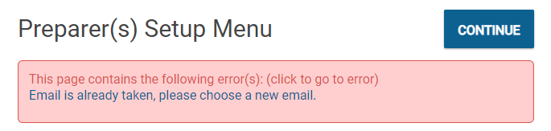
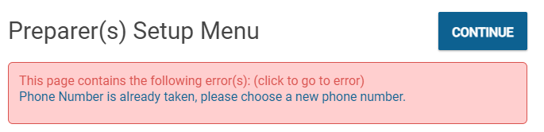
Receiving the error messages above means that your phone number or email is already linked to an account. Here are some reasons why your information is linked to another account.
- Another preparer used your information.
- Someone created an Employee Account with this information.
- The past account information was transferred from another office or system.
Here are some remediation steps to fix the issue.
- Go to the preparer record. Check the option to permission multiple accounts to use the same contact information. If someone else is using these pieces of information, the boxes need to be checked on their account as well.
- The information might be used by more than one tax preparer. Contact Support to release the email and phone number to multiple preparers.
- Assess whether this information was used in another office or with any other associated software programs. Contact Support for assistance.
- [FAQs](https://help.taxxsavage.com/faqs?hsLang=en)
- [Taxx Savage ProWeb](https://help.taxxsavage.com/taxx-savage-proweb?hsLang=en)
- [Support](https://help.taxxsavage.com/support?hsLang=en)
- [Reports](https://help.taxxsavage.com/reports?hsLang=en)
- [Account](https://help.taxxsavage.com/account?hsLang=en)
- [Federal Tax Questions](https://help.taxxsavage.com/federal-tax-questions?hsLang=en)
- [E-file and Direct Deposit](https://help.taxxsavage.com/e-file-and-direct-deposit?hsLang=en#main-content)
- [E-filing Questions](https://help.taxxsavage.com/e-file-and-direct-deposit?hsLang=en#e-filing-questions)
- [Deductions and Credits](https://help.taxxsavage.com/deductions-and-credits?hsLang=en)
- [Taxes](https://help.taxxsavage.com/taxes?hsLang=en)
- [General instructions](https://help.taxxsavage.com/general-instructions?hsLang=en)
- [Mobile App Questions and Troubleshooting](https://help.taxxsavage.com/mobile-app-questions-and-troubleshooting?hsLang=en)
- [Configuration](https://help.taxxsavage.com/configuration?hsLang=en)
- [General FAQ](https://help.taxxsavage.com/general-faq?hsLang=en)
- [Information Central](https://help.taxxsavage.com/information-central?hsLang=en)
- [Taxx Savage Pro Desktop](https://help.taxxsavage.com/taxx-savage-pro-desktop?hsLang=en)
- [Client Hub Navigation](https://help.taxxsavage.com/client-hub-navigation?hsLang=en#main-content)
- [Tools](https://help.taxxsavage.com/client-hub-navigation?hsLang=en#tools)
[](https://taxxsavage.com)
[mailto:email@email.com](mailto:email@email.com)
Copyright © 2026, Taxx Savage