---
title: Return Review
description: how to review your return
---
[Skip to content](https://help.taxxsavage.com/here-is-how-to-review-your-return#main-content)
English
Show submenu for translations
[](https://taxxsavage.com/)
Open main navigation
Close main navigation
- English
Show submenu for translations
- Contact us
Contact us
How can we help you?
- There are no suggestions because the search field is empty.
1. [Taxx Savage Knowledge Base](https://help.taxxsavage.com/?hsLang=en)
2. [FAQs](https://help.taxxsavage.com/faqs?hsLang=en)
# Return Review
## Here is how to review your return
Once the information is entered into our tax software, there is an option to review the information before filing. This review process can help catch errors and mistakes, giving you time to make changes before the return is sent.
Depending on the level of expertise of the filer, the review process can be mandatory or optional. Follow the directions below to set up the review process in the Configuration tab. If the review process is optional, no further action is required.
To start the review from the start page, select Configuration.
\- Open Security Templates and click Edit. If you do not see a template listed, create one.
\- If mandatory, be sure to leave the box with Do Not Force Return Review unchecked. Select Continue when finished.
\- If the template was new, Assign the tax preparers in the system.
The Return Review process follows this workflow.
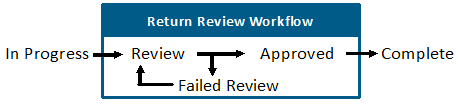
\- Once the tax return is done, it will be marked Ready For Review. The reviewer will save and exit. The reviewer will get a notification that a return is ready for review.
\- The reviewer will Select the review and open the return. Once the review is complete, the reviewer can either approve or fail the tax return. Approved returns are marked Complete, while Failed returns require an explanation.
\- If the review failed, the original preparer is notified to make changes and resubmit. This process is repeated until the tax return is approved.
- [FAQs](https://help.taxxsavage.com/faqs?hsLang=en)
- [Taxx Savage ProWeb](https://help.taxxsavage.com/taxx-savage-proweb?hsLang=en)
- [Support](https://help.taxxsavage.com/support?hsLang=en)
- [Reports](https://help.taxxsavage.com/reports?hsLang=en)
- [Account](https://help.taxxsavage.com/account?hsLang=en)
- [Federal Tax Questions](https://help.taxxsavage.com/federal-tax-questions?hsLang=en)
- [E-file and Direct Deposit](https://help.taxxsavage.com/e-file-and-direct-deposit?hsLang=en#main-content)
- [E-filing Questions](https://help.taxxsavage.com/e-file-and-direct-deposit?hsLang=en#e-filing-questions)
- [Deductions and Credits](https://help.taxxsavage.com/deductions-and-credits?hsLang=en)
- [Taxes](https://help.taxxsavage.com/taxes?hsLang=en)
- [General instructions](https://help.taxxsavage.com/general-instructions?hsLang=en)
- [Mobile App Questions and Troubleshooting](https://help.taxxsavage.com/mobile-app-questions-and-troubleshooting?hsLang=en)
- [Configuration](https://help.taxxsavage.com/configuration?hsLang=en)
- [General FAQ](https://help.taxxsavage.com/general-faq?hsLang=en)
- [Information Central](https://help.taxxsavage.com/information-central?hsLang=en)
- [Taxx Savage Pro Desktop](https://help.taxxsavage.com/taxx-savage-pro-desktop?hsLang=en)
- [Client Hub Navigation](https://help.taxxsavage.com/client-hub-navigation?hsLang=en#main-content)
- [Tools](https://help.taxxsavage.com/client-hub-navigation?hsLang=en#tools)
[](https://taxxsavage.com)
[mailto:email@email.com](mailto:email@email.com)
Copyright © 2026, Taxx Savage